MongoDB
What is Mongodb
MongoDB is a document-oriented NoSQL database used for storing, querying, and managing data. MongoDB is conceptually different from traditional relational databases.
The advantages from MongoDB
MongoDB stores data in flexible JSON-like documents.
It works well with modern applications.
In addtion it is flexible, scalable and therefore usable for numerous tasks.
Why we use MongoDB
We use MongoDB because we need/use the main advantages of scalability and flexibility. Compared to a MySQL database, we can insert new data more easily. For example if we relanize later that we need an extra column to store data, it needs to be inserted into each column. In mongoDB, it’s easier to insert additional data into collections. Also, it’s easier to program the API because It can receive the data without converting it to JSON just like MySQL. The JSON data can then be sent using the API to Android
How to install and configurate MongoDB
We use a docker container to deploy a mongoDB database. With a MongoDB container, one can easily set up and configure MongoDB without the need for complex installation procedures. It give also the possibility to get an instance, which deployed fast and easy. Another advantage is that containers are well-suited for scaling applications horizontally. Containers enable you to deploy specific versions of MongoDB and ensure that the required libraries and configurations are included
Some steps to run mongoDB in the container
Pull the Image: docker pull mongo
Start the container: docker run –name {name} mono -p 27017:27017 (-p we map the container’s port 27017 to the host’s port 27017).
After this simble steps we have an container that deploy MongoDB.
But now we use aws to deploy MongoDB.
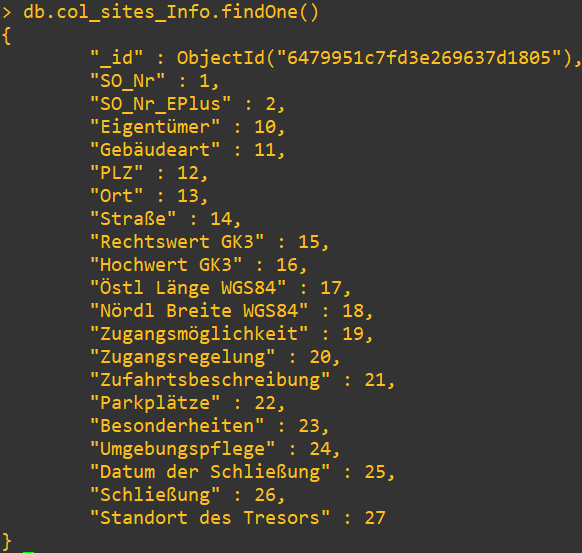
What collection we use We use a database called airtracked-db, which contains two collections. The first collection named AT_sites_atc stores all data from the sites, which are needed later. The second collection At_pilots contain the pilots togehter their assigned sites.
In the first collection one can see the elements. Every element is used. The _id and So_Nr are unique and are very important for the work. For example the unique id help to find the other information.
Why we need a database
The The data that we will later use in Android and in the Node-JS app comes from an Excel file. This Excel file contains 40000 entries, all of which must be stored in the database. Since there is no converter like in MySQL, one have to write an own script. The script is coded in Python because it is the simplest language to reach our goal. This script should read the data from exel and write it in the database
The Concept
The script connects to the database
The data is read from exel.
The data is then written into the database by exel
The most important Code
To connect to Database
database = MongoClient('mongodb://ip:27017')
Read data from Excel
df = pandas.read_excel("data.xlsx")
Select Database
db = database["databasename"]
And wirte the data to Database
db.collection.insert_many(data)
Other Script
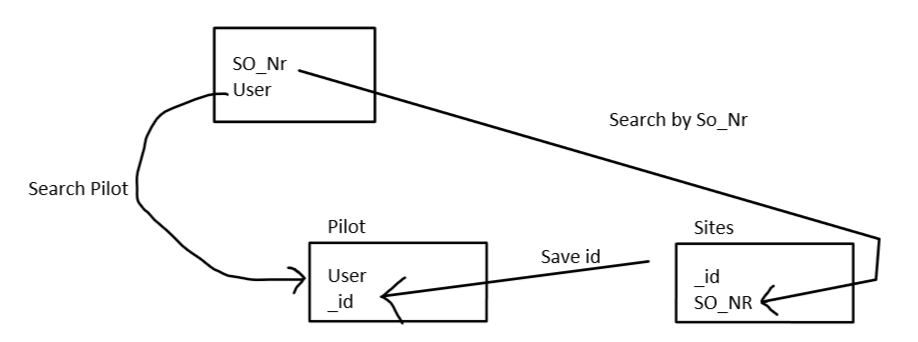
Another task was tocreate a base script for the API that maps the data to the pilots. The IDs are assigned to the pilots. The pilot can then use this ID to see what sites are are map to their.
How it work
A user and the so_nr of the function are specified. Then the ID is searched for the SO_nr, which is then used to match it to the pilot. Once assigned, on can search for the pilot and retrieve all IDs assigned to the pilots. With this ids one can determine the sites.
The most important code
def assign_sites(user, so_nr):
      objects = old_collection.find_one({"SO_Nr": so_nr})
      if objects:
      value = objects['_id']
      new_collection.insert_one({"name":user,"id":ObjectId(value)})
There the user and the id, which was found by so_nr, are stored in the mongodb.
output

In that example a user is assignt to a site by the id.